
Most generative AI image tools are fun for creating one-off images or memes, but they completely fall apart the moment you try to use them for an actual, scalable content pipeline.
If you are running a channel, building an AI influencer, or creating brand content, your character basically becomes your identity.
The problem has always been that AI doesn’t remember faces.
Every time you generate something, it starts from scratch, which means that even with a good prompt, the face or style shifts, your consistency rate plunges from a clean 90% down to a frustrating 30%, and your continuity is dead in the water.
Standard industry advice tells you to compile reference folders, training intensive local models, or fight chaotic text prompts just to get a character to look the same twice.
It’s a massive credit drain.
I wanted to show you how OpenArt’s new Character 2.0 update could turn character consistency into a predictable, routine software workflow.
Here is exactly how the system operates and how it performs in production.
Follow Along on OpenArt
Want to build your own reusable character?
👉 Use the official link below to access OpenArt’s all-in-one workspace and follow this exact pipeline. Use the code OART15 for 15% off.
1. The Identity Foundation: The “Build Your Character” Wizard
The OpenArt interface gives you legacy options like training via uploaded reference files or relying on raw text interpretations.
However, the most effective tool in the system is an exclusive feature called Build Your Character.
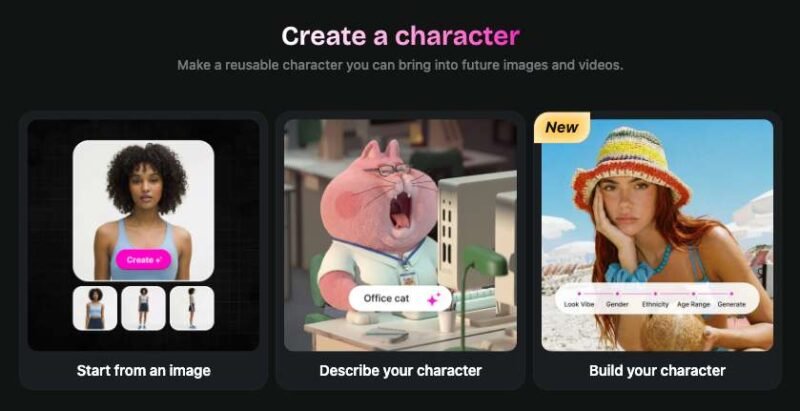
This module completely rethinks how an AI identity is formed.
What do I mean by that? Instead of drafting a massive text prompt and hoping the engine reads it accurately, the interface uses a structured construction setup where you select physical characteristics one by one.
- The Look and Vibe: You select from highly specific visual aesthetics like Casual, Street, Fashion, 2000s Aesthetic, or Dystopian. This locks in a whole visual language, affecting the lighting, clothing, and overall feel.
- Demographics: You select Gender, Ethnicity, and Age Range with simple clicks. No prompting required.
- The Optimization Field: To ensure the best possible result, you use the optional description box to lock in exact features. I added: “sharp features, short dark hair, confident expression, subtle futuristic styling.”
Within 60 seconds, the engine generates up to four choices. You can of course continue to generate more at this point if you’re not satisfied.
Once you select the one you want, you name it so this identity gets locked into the ecosystem. At this point, you can also create a voice for your character and give it a back story.

2. The Execution: Rendering Stills with Nano Banana 2 & Auto Polish
Building the identity asset is step one, but making it work across different scenes is where the workflow opens up.
To generate images, you head to the image creator workspace and use these two specific settings:
- The Nano Banana 2 Model: This specific engine handles realism, fine detail, and character consistency at a level that most other standard models can’t match.
- Direct Character Tagging & Auto Polish: Inside the prompt box, you choose your character asset by hovering over the “add visual references” box, select the character you want to use, and add the @ sign to lock the identity. Then, you toggle on Auto Polish. This is OpenArt’s prompt enhancement feature where it takes your basic concept and expands it into a detailed, model-optimized version without changing your creative direction.
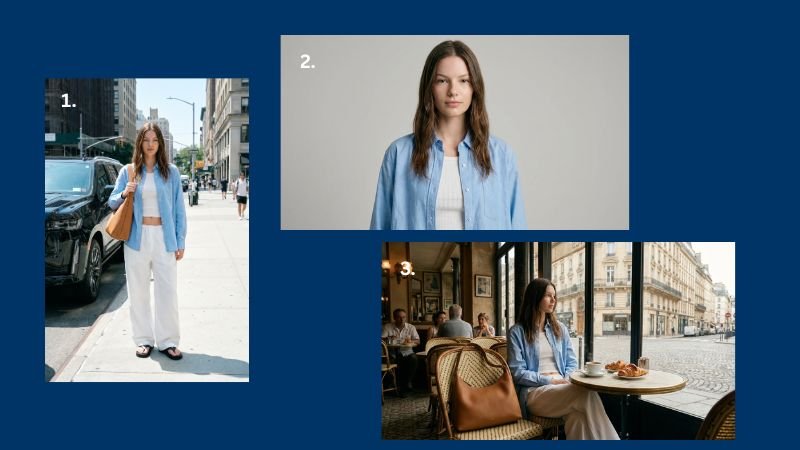
My first move was rendering a crisp, direct-to-camera studio portrait against a completely neutral background at a 16:9 aspect ratio and upscaled to 4K resolution. This neutral shot acts as a baseline template, which is critical for the animation phase later.
From there, I generated a second, atmospheric cinematic shot in a Parisian cafe. The lighting, environments, and colors changed completely, but the character’s face remained flawlessly identical across all three.
3. Bringing Images to Life: The 3 Video Frameworks
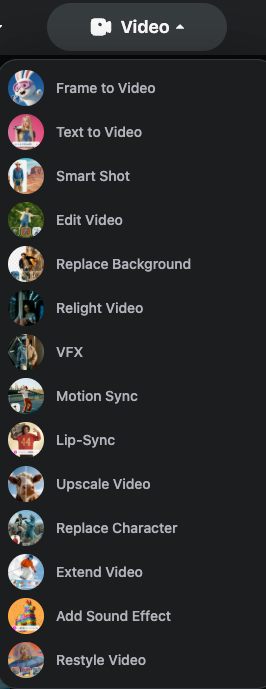
Once your images are ready, you can move them directly into the video section.
OpenArt hosts different specialized animation engines natively within the workspace, allowing you to choose the exact model that fits your visual direction:
| Video Feature | The Underlying Engine | How It Operates |
|---|---|---|
| Lip Sync | Native Text-to-Speech Engine | You upload that clean, neutral studio shot. Using the text-to-speech option, you write out a script, pick a voice model that fits, and generate. The lip sync is highly accurate, the voice delivery feels natural, and your character looks like a real person talking directly to the camera. |
| Frame to Video (Cinematic) | Kling 3 Integration | Built specifically for long-form narrative content with realistic physics. You upload a still (like the rainy street shot) as your starting frame. In the prompt box, you focus purely on the motion you want rather than describing the scene. It handles fabric movement, ambient details, and camera pacing like an actual film frame. |
| Frame to Video (Stylized) | Seedance 2.0 Integration | Seedance is the most stylized option of the three video workflows. When animating more artistic or abstract character stills, this engine creates motion that feels highly expressive, fluid, and artistic rather than strictly photorealistic. |
4. Production Leverage: Mastering Motion Sync
Although generating video from text prompts is impressive, it often becomes an absolute credit sink for serious businesses because AI physics are fundamentally random.
Let’s say you want a character to execute a specific, natural human action like walking down a corridor and gesturing during a conversation, you can burn through a monthly budget trying to get it right.
OpenArt solves this bottleneck through a workflow called Motion Sync.
Instead of animating a blank slate, you upload a standard reference video clip of a real person moving naturally.
You select your saved character asset, choose the Kling 3 rendering system, and describe the background modifications you want.
It effectively tracks the human actor’s skeletal frame and maps your consistent character directly over their body movements.
This single feature unlocks immense leverage for small teams: you can capture basic reference movements on a mobile phone in your room, and effortlessly turn it into studio-grade character footage.
The Operational Verdict: Is It Worth It?
By integrating everything I covered here, from the initial character construction wizard and Nano Banana 2 image workspace to native lip-syncing and Kling 3 motion tracking, OpenArt changes the content engine game.
Instead of spending hours jumping between multiple disconnected web apps just trying to make a face look consistent twice, it consolidates your production into a 60-second routine.
If you are serious about building a sustainable media brand or a fast-moving content funnel, treating your creation tools as a single, connected infrastructure is a non-negotiable cost of doing business.
OpenArt turns creative generation from a chaotic guessing game into a predictable software routine.
Build Your Content Infrastructure Today
Stop wasting rendering credits on drifting faces and inconsistent text prompts. Click below to start building your consistent character system.
Follow Along on OpenArt
Want to build your own reusable character?
👉 Use the official link below to access OpenArt’s all-in-one workspace and follow this exact pipeline. Use the code OART15 for 15% off.