

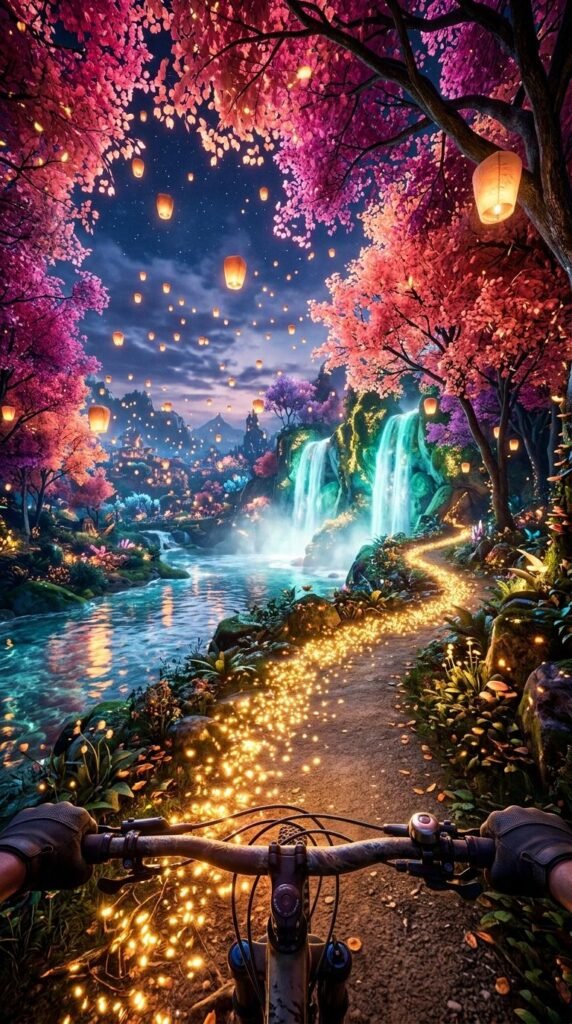
The tool I’m using to create my videos is Pixverse, and they give out free daily credits for you to play around with.
PART 1: FIRST FRAME IMAGE PROMPT
Create the first frame of the video by generating an image in Pixverse.
I usually use the Nano Banana 2 model but do play around with other models to fit your needs.
Here is the prompt:
First-person perspective riding a bicycle down a magical trail lit by glowing golden embers. Above, a canopy of vibrant magenta and coral trees sways softly as glowing paper sky lanterns drift into the dusk sky. In the background, luminous turquoise waterfalls splash into crystal-clear rivers reflecting warm lantern light. Hyper-detailed, fantasy world-building, high-contrast bioluminescent lighting, Unreal Engine 5 aesthetic, 4k resolution.
PART 2: VIDEO PROMPT SCRIPT (SHOT-BY-SHOT)
I used Seedance Mini (promotional price now) to generate the video. So much cheaper now but still high quality. Remember to set your aspect ratio, length, and audio on. Alternatively, Pixverse V6 is definitely worth a try too. High quality and one of the lowest cost models.
This is the exact prompt I used:
Concept: Enchanted Bicycle Ride (10 Seconds)
Style/Lighting: Highly saturated bioluminescent glow, warm lantern light, silky smooth forward tracking motion, dreamy aesthetic.
- 0:00 – 0:02: The Hook. First-person POV looking down over bicycle handlebars as the rider begins traveling along a glowing path of golden embers under a dense canopy of pink blossom trees filled with floating lanterns.
- 0:02 – 0:05: The Scenic Reveal. As the bike glides forward down a gentle slope, the forest opens up to reveal cascading cyan waterfalls pouring from rocky cliffs into a glowing river.
- 0:05 – 0:08: Atmospheric Drift. Golden petals and glowing embers float softly past the handlebars while the lanterns overhead drift higher into the twilight sky, casting reflections across the water below.
- 0:08 – 0:10: The Seamless Loop. The path curves gently back into a glowing tunnel of pink blossom trees, matching the precise speed, lighting, and camera angle of the opening frame for a continuous 10-second loop.
Here’s a tip: You can generate the video using 720p as the resolution instead of 1080p. This will reduce the cost dramatically. Download the video and upscale it here.
PART 3: MUSIC TRACK
This was created inside Pixverse as well.
I like the Google Lyria model but you can also choose to use MiniMax or Elevenlabs too.
Here is the prompt:
Audio Prompt / Sound Mix Direction: Soothing acoustic guitar and piano melody mixed with gentle nature sound effects.
- 0:00 – 0:03: Starts with soft, warm acoustic guitar fingerpicking paired with gentle bicycle chain hum and faint wind chimes.
- 0:04 – 0:07: Light piano harmonies enter smoothly alongside soft, echoing waterfall splashes as the river comes into view.
- 0:08 – 0:10: The musical arrangement resolves on a comforting chord hold while magical sparkle/chime sound effects fade quietly into the loop restart.
PART 4: PUTTING IT ALL TOGETHER
Finally, I uploaded the finished video and audio track into Capcut (or Canva) and made slight adjustments to the color to my liking. If you are trying to monetize with Facebook using the Content Monetization program, take note that your videos need to be at least 10 seconds long. A trick you can use is to adjust the speed of your video to 0.95, which adds half a second to a 10 seconds video, ensuring you comply with the requirements.
That’s it! Don’t forget to try out Pixverse as it’s one of the most capable and value for money tools out there right now!