

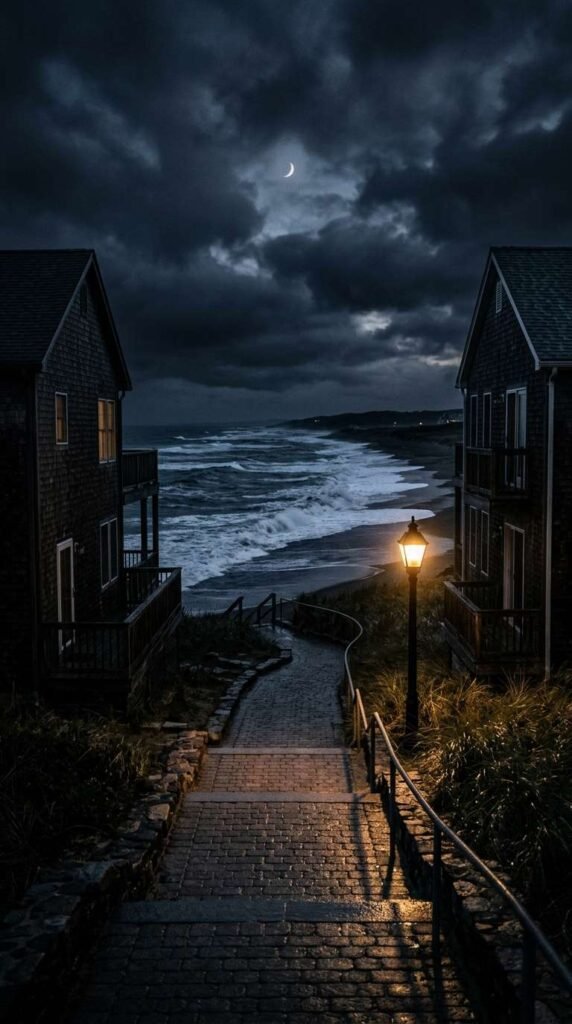
The tool I’m using to create my videos is Pixverse, and they give out free daily credits for you to play around with.
PART 1: FIRST FRAME IMAGE PROMPT
Create the first frame of the video by generating an image in Pixverse.
I usually use the Nano Banana 2 model but do play around with other models to fit your needs.
Here is the prompt:
Cinematic nighttime perspective looking down a paved walkway toward an ocean shore. Two dark beach houses frame the left and right edges. A single glowing orange lamppost casts a golden pool of light onto the ground, contrasting with dark moody clouds and a faint crescent moon hovering in the night sky. Crashing waves with white sea spray, high-contrast chiaroscuro lighting, moody coastal aesthetic, 4k resolution.
PART 2: VIDEO PROMPT SCRIPT (SHOT-BY-SHOT)
I used Seedance Mini (promotional price now) to generate the video. So much cheaper now but still high quality. Remember to set your aspect ratio, length, and audio on. Alternatively, Pixverse V6 is definitely worth a try too. High quality and one of the lowest cost models.
This is the exact prompt I used:
Concept: Coastal Nightfall Path (10 Seconds, Seamless Loop)
Style/Lighting: Deep moody twilight, warm amber lamppost glow vs. cool dark clouds, slow steady wave action, peaceful atmosphere.
- 0:00 – 0:02: The Hook. Static centered camera shot framed between two beach houses, looking down a lit pathway toward crashing ocean waves under a dark cloudy sky and crescent moon.
- 0:02 – 0:05: The Wave Roll. A large ocean wave swells and crashes onto the shore, spraying white sea foam into the air while dark clouds drift subtly across the moonlit sky.
- 0:05 – 0:08: The Warm Glow. The central streetlamp hums with a warm amber glow, casting soft flickering light reflections across the wet concrete path and surrounding bushes.
- 0:08 – 0:10: The Seamless Loop. A second wave swells along the horizon as the clouds maintain steady motion, lining up smoothly with the opening frame for an infinite, calming loop.
Here’s a tip: You can generate the video using 720p as the resolution instead of 1080p. This will reduce the cost dramatically. Download the video and upscale it here.
PART 3: MUSIC TRACK
This was created inside Pixverse as well.
I like the Google Lyria model but you can also choose to use MiniMax or Elevenlabs too.
Here is the prompt:
Audio Prompt / Sound Mix Direction: Soothing ambient piano melody layered with heavy, realistic ocean wave crashes and soft night breeze.
- 0:00 – 0:03: Opens with the deep, resonant sound of an ocean wave breaking, blended with a slow, emotional piano chord progression.
- 0:04 – 0:10: Soft ambient wind rustling pairs with warm piano harmonics that fade into a serene, lingering sustain, matching the rhythmic flow of the waves.
PART 4: PUTTING IT ALL TOGETHER
Finally, I uploaded the finished video and audio track into Capcut (or Canva) and made slight adjustments to the color to my liking. If you are trying to monetize with Facebook using the Content Monetization program, take note that your videos need to be at least 10 seconds long. A trick you can use is to adjust the speed of your video to 0.95, which adds half a second to a 10 seconds video, ensuring you comply with the requirements.
That’s it! Don’t forget to try out Pixverse as it’s one of the most capable and value for money tools out there right now!