

The tool I’m using to create my videos is Pixverse, and they give out free daily credits for you to play around with.
PART 1: FIRST FRAME IMAGE PROMPT
Create the first frame of the video by generating an image in Pixverse.
I usually use the Nano Banana 2 model but do play around with other models to fit your needs.
Here is the prompt:
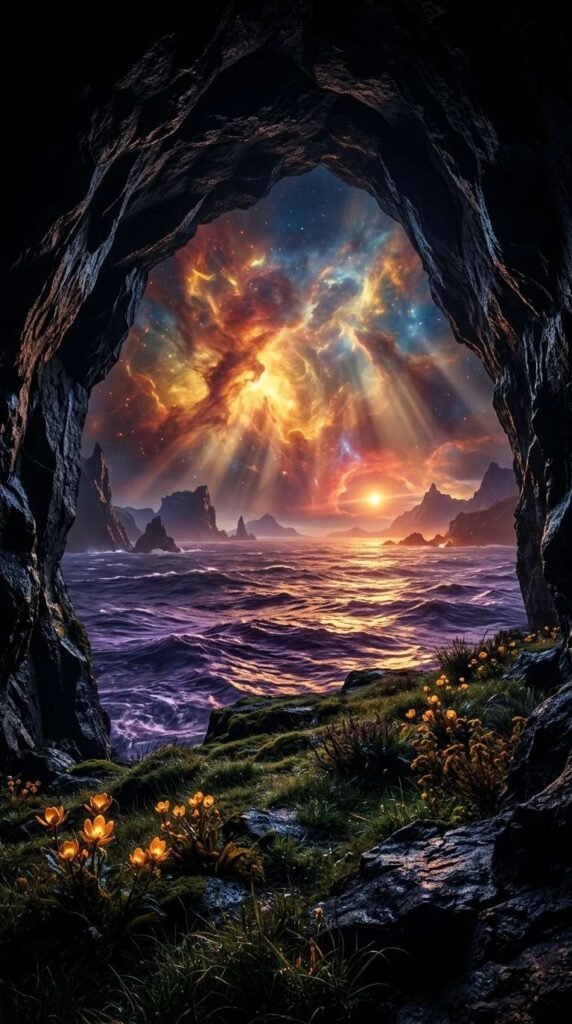
Cinematic perspective inside a rocky coastal cave looking out at an alien sea. Golden-amber and crimson light beams filter through a giant cosmic nebula in the sky, reflecting brilliant warm tones across dark violet ocean waves. The grassy ledge in the foreground is dotted with glowing amber flowers. Dark silhouette cave walls frame the scene, high-dynamic range, fine detailed rock textures, surreal fantasy aesthetic, 4k resolution.
PART 2: VIDEO PROMPT SCRIPT (SHOT-BY-SHOT)
I used Seedance Mini (promotional price now) to generate the video. So much cheaper now but still high quality. Remember to set your aspect ratio, length, and audio on. Alternatively, Pixverse V6 is definitely worth a try too. High quality and one of the lowest cost models.
This is the exact prompt I used:
Concept: Celestial Violet Horizon (10 Seconds, Seamless Loop)
Style/Lighting: Deep golden-amber and violet color palette, bioluminescent water reflections, smooth push-out camera motion, peaceful mood.
- 0:00 – 0:03: The Hook. Centered shot inside a dark stone cave looking out through its rocky archway at a glowing violet ocean under a radiant golden-amber nebula sky. In the foreground, green grass and yellow wildflowers catch the warm cosmic light.
- 0:03 – 0:06: The Exit Push. Camera slowly pushes forward, moving out of the cave shadows and crossing over the grass ledge toward the sandy shore as gentle violet waves lap against the beach.
- 0:06 – 0:08: Cosmic Drift. Swirling rose-pink and amber clouds shift subtly across the starry galaxy sky while bioluminescent ripples glow across the sea surface.
- 0:08 – 0:10: The Seamless Loop. Camera settles low near the ocean edge as the waves and swirling cosmic clouds sync continuously back to the opening frame position for an infinite, soothing loop.
Here’s a tip: You can generate the video using 720p as the resolution instead of 1080p. This will reduce the cost dramatically. Download the video and upscale it here.
PART 3: MUSIC TRACK
This was created inside Pixverse as well.
I like the Google Lyria model but you can also choose to use MiniMax or Elevenlabs too.
Here is the prompt:
Audio Prompt / Sound Mix Direction: Soothing ambient piano chords blended with gentle ocean wave crashes and soft cosmic synth pads.
- 0:00 – 0:03: Opens with a soft, warm piano note echoing inside a reverb-rich cave environment, paired with distant, calm wave crashes.
- 0:04 – 0:10: Gentle ambient synth swells enter as the camera exits the cave, layering with soft water splashing audio that settles into a peaceful, lingering harmonic resolve.
PART 4: PUTTING IT ALL TOGETHER
Finally, I uploaded the finished video and audio track into Capcut (or Canva) and made slight adjustments to the color to my liking. If you are trying to monetize with Facebook using the Content Monetization program, take note that your videos need to be at least 10 seconds long. A trick you can use is to adjust the speed of your video to 0.95, which adds half a second to a 10 seconds video, ensuring you comply with the requirements.
That’s it! Don’t forget to try out Pixverse as it’s one of the most capable and value for money tools out there right now!