

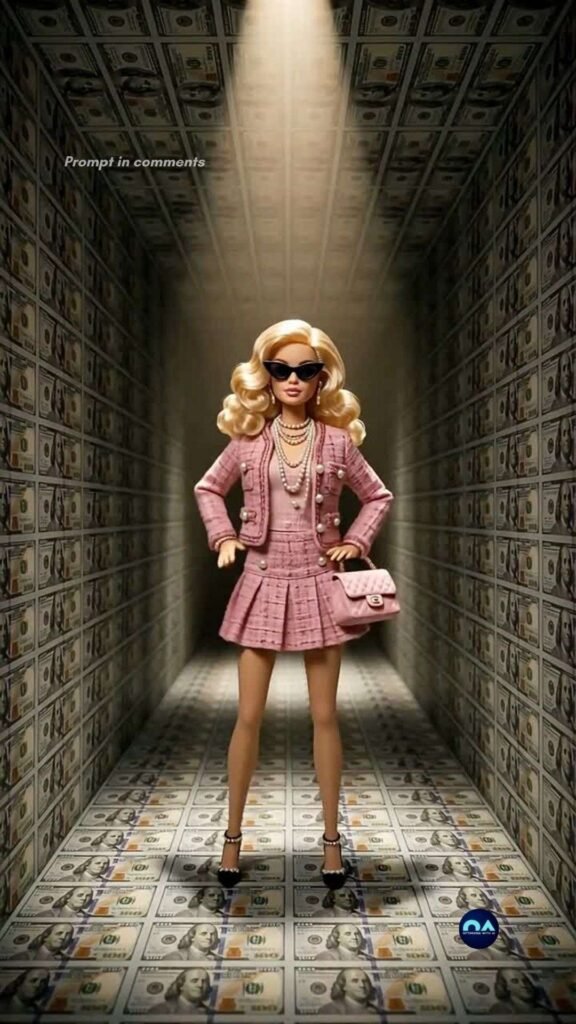
The tool I’m using to create my videos is Pixverse, and they give out free daily credits for you to play around with.
PART 1: FIRST FRAME IMAGE PROMPT
Create the first frame of the video by generating an image in Pixverse.
I usually use the Nano Banana 2 model but do play around with other models to fit your needs.
Here is the prompt:
Centered wide shot of a glamour doll in a pink textured designer outfit standing in an infinity room wallpapered with crisp cash bills. Warm spotlight beam focusing directly on the doll while the surrounding cash walls recede into shadow. High-contrast editorial look, hyper-detailed textures, photorealistic 3D render, dramatic lighting, 8k resolution.
PART 2: VIDEO PROMPT SCRIPT (SHOT-BY-SHOT)
I used Seedance Mini (promotional price now) to generate the video. So much cheaper now but still high quality. Remember to set your aspect ratio, length, and audio on. Alternatively, Pixverse V6 is definitely worth a try too. High quality and one of the lowest cost models.
This is the exact prompt I used:
Concept: Cash Room Fashion Loop (10 Seconds)
Style/Lighting: High-contrast studio lighting, forced perspective, stop-motion style movement, punchy fashion vibe.
- 0:00 – 0:02: The Hook. Centered shot of a fashion doll in a pink fuzzy outfit standing inside a vortex room lined with cash. She snaps into a pose, raising one hand while staring straight ahead through sunglasses.
- 0:02 – 0:05: The Rhythm Move. She shifts hips side-to-side in a rigid, stop-motion animation style, throwing both arms up in sync with the heavy hip-hop bass beat.
- 0:05 – 0:08: The Spin. The camera subtly zooms in as the doll does a quick, stylized 360-degree pivot spin, showing off the back of her textured sweater against the cash-lined background.
- 0:08 – 0:10: The Final Pose. She turns back to face front, striking a double peace-sign pose as the camera pulls back smoothly to the starting position for a seamless loop.
Here’s a tip: You can generate the video using 720p as the resolution instead of 1080p. This will reduce the cost dramatically. Download the video and upscale it here.
PART 3: MUSIC TRACK
This was created inside Pixverse as well.
I like the Google Lyria model but you can also choose to use MiniMax or Elevenlabs too.
Here is the prompt:
Audio Prompt / Sound Mix Direction: Heavy, energetic Southern hip-hop/trap beat featuring crisp 808 bass slides, sharp snare snaps, and a looped vocal chant (“Bands a make her dance” style).
- 0:00 – 0:03: Opens immediately with a hard-hitting sub-bass drop and vocal hook, synchronized with the doll’s initial snap pose.
- 0:04 – 0:10: Driving hi-hats and deep basslines keep a steady, rhythmic pulse that perfectly matches the puppet-like, stop-motion dance steps.
PART 4: PUTTING IT ALL TOGETHER
Finally, I uploaded the finished video and audio track into Capcut (or Canva) and made slight adjustments to the color to my liking. If you are trying to monetize with Facebook using the Content Monetization program, take note that your videos need to be at least 10 seconds long. A trick you can use is to adjust the speed of your video to 0.95, which adds half a second to a 10 seconds video, ensuring you comply with the requirements.
That’s it! Don’t forget to try out Pixverse as it’s one of the most capable and value for money tools out there right now!