

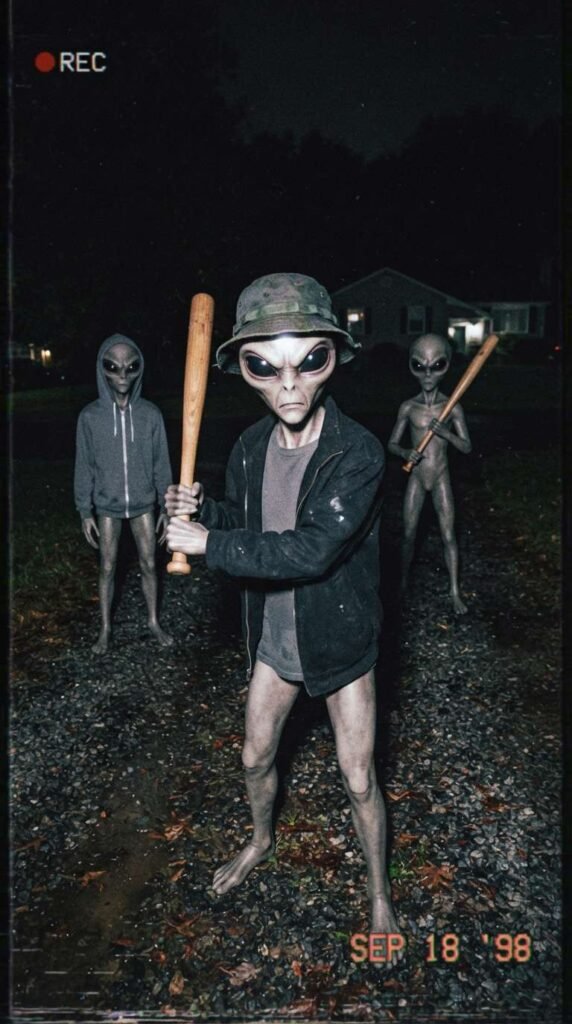
The tool I’m using to create my videos is Pixverse, and they give out free daily credits for you to play around with.
PART 1: FIRST FRAME IMAGE PROMPT
Create the first frame of the video by generating an image in Pixverse.
I usually use the Nano Banana 2 model but do play around with other models to fit your needs.
Here is the prompt:
Raw handheld night camera flash photograph of three realistic grey aliens standing outside in a dark gravel driveway. The main alien in the foreground wears a bucket hat and open jacket, holding up a wooden baseball bat aggressively. The background alien wears a gray hoodie while the third holds a baseball bat over its shoulder. Low-quality VHS camera glow, grainy noise, harsh direct flash photography, ultra-realistic textures, chaotic found-footage style, 8k resolution.
PART 2: VIDEO PROMPT SCRIPT (SHOT-BY-SHOT)
I used Seedance Mini (promotional price now) to generate the video. So much cheaper now but still high quality. Remember to set your aspect ratio, length, and audio on. Alternatively, Pixverse V6 is definitely worth a try too. High quality and one of the lowest cost models.
This is the exact prompt I used:
Concept: Chaotic Found-Footage Alien Montage (15 Seconds)
Style/Lighting: Harsh night flash, handheld camera shake, low-fi VHS video quality, rapid absurd cuts.
0:00 – 0:02: The Confrontation. Flashlight camera illuminates three grey aliens in hoodies and bucket hats on a dark dirt road. One alien aggressively swings a wooden baseball bat toward the lens.
0:02 – 0:04: The Ride. Sudden hard cut to night footage of a skinny grey alien waving one hand triumphantly in the air while riding a donkey galloping down a gravel path.
0:04 – 0:06: The Dance. Quick cut to a street corner at night; a tall grey alien spins a woman with long black hair in a playful dance near a parked car.
0:06 – 0:08: The Skate Park. Rapid cut to a pink furry alien costume character doing wild roller-skating spins inside a dark concrete skate park bowl.
0:08 – 0:11: The Police Pursuit. Hard cut to an alien running at top speed across a wet asphalt street, dodging flashing police car headlights and sirens in the foggy night.
0:11 – 0:13: The Car Chill. Interior car camera shot at night. A skinny grey alien sits in the passenger seat calmly blowing heavy smoke from its mouth while holding a large wrapped burrito.
0:13 – 0:15: The Freeze-Frame Finish. The alien suddenly looks directly at the camera with wide black eyes, holding up the burrito like a prize as a text graphic pops on screen and the clip freezes.
Here’s a tip: You can generate the video using 720p as the resolution instead of 1080p. This will reduce the cost dramatically. Download the video and upscale it here.
PART 3: MUSIC TRACK
This was created inside Pixverse as well.
I like the Google Lyria model but you can also choose to use MiniMax or Elevenlabs too.
Here is the prompt:
Audio Prompt / Sound Mix Direction: High-energy, chaotic hip-hop/trap beat with heavy distorted bass slides, rapid snare rolls, and chaotic vocal shouts.
0:00 – 0:02: Starts with an angry vocal yell (“What the hell are you looking at?!”) instantly cut off by a heavy bass drop and bat-swing WHOOSH.
0:02 – 0:10: Driving trap drum beat with loud, distorted 808 bass slides matching each rapid scene cut, layered with faint police siren wails and cheering sound effects.
0:11 – 0:15: Drums drop out leaving just the heavy bass synth line, finishing with a sharp record-scratch sound effect right as the alien stares with the burrito on the freeze frame.
PART 4: PUTTING IT ALL TOGETHER
Finally, I uploaded the finished video and audio track into Capcut (or Canva) and made slight adjustments to the color to my liking. If you are trying to monetize with Facebook using the Content Monetization program, take note that your videos need to be at least 10 seconds long. A trick you can use is to adjust the speed of your video to 0.95, which adds half a second to a 10 seconds video, ensuring you comply with the requirements.
That’s it! Don’t forget to try out Pixverse as it’s one of the most capable and value for money tools out there right now!