

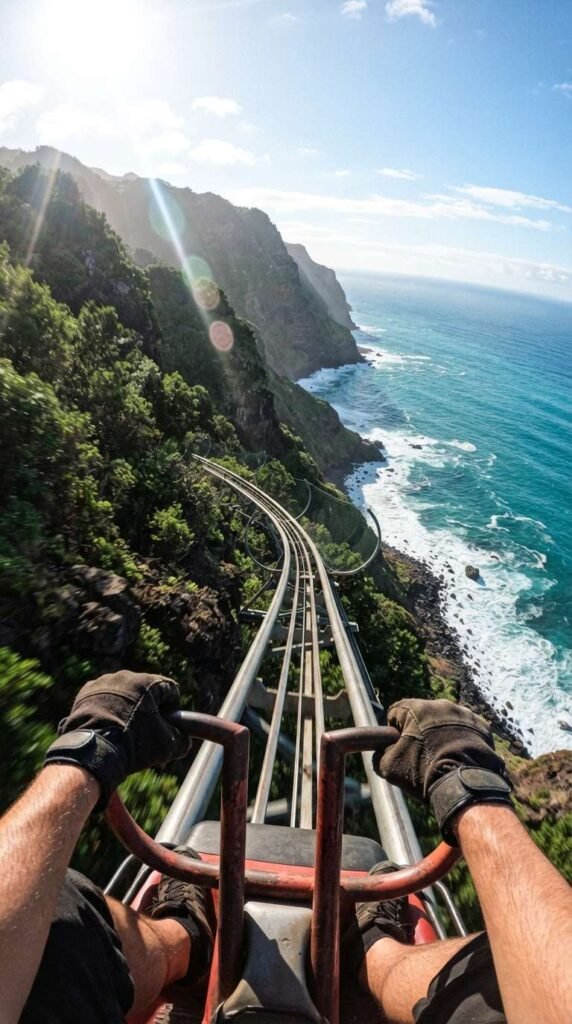
The tool I’m using to create my videos is Pixverse, and they give out free daily credits for you to play around with.
PART 1: FIRST FRAME IMAGE PROMPT
Create the first frame of the video by generating an image in Pixverse.
I usually use the Nano Banana 2 model but do play around with other models to fit your needs.
Here is the prompt:
First-person POV photograph holding onto metal coaster handles on a steep steel track descending vertically down dramatic green mountain cliffs over a turquoise ocean. Deep blue sea waves crash against white sea foam below under a bright sunny sky with realistic lens flare. High-speed action photography, photorealistic motion blur, vivid green foliage and dark rock textures, 8k resolution.
PART 2: VIDEO PROMPT SCRIPT (SHOT-BY-SHOT)
I used Seedance Mini (promotional price now) to generate the video. So much cheaper now but still high quality. Remember to set your aspect ratio, length, and audio on. Alternatively, Pixverse V6 is definitely worth a try too. High quality and one of the lowest cost models.
This is the exact prompt I used:
Concept: Coastal Cliff Coaster Drop (10 Seconds, Seamless Loop)
Style/Lighting: Bright natural daylight, intense high-speed camera motion, dramatic perspective, thrilling action aesthetic.
- 0:00 – 0:02: The Hook. First-person POV camera holding onto coaster handle bars at the top of a steep track overlooking a vast ocean and towering lush green cliffs.
- 0:02 – 0:05: The Vertical Drop. The coaster plunges rapidly down the track along the cliff face, with ocean waves crashing violently far below as motion blur whips past the lens.
- 0:05 – 0:08: The Cliffside Curve. The coaster pulls out of the drop, curving tightly around a grassy cliff ledge while ocean spray shines in the bright sunlight.
- 0:08 – 0:10: The Seamless Loop. The track levels out smoothly toward the next crest, perfectly aligning speed and alignment to loop infinitely back to the top drop.
Here’s a tip: You can generate the video using 720p as the resolution instead of 1080p. This will reduce the cost dramatically. Download the video and upscale it here.
PART 3: MUSIC TRACK
This was created inside Pixverse as well.
I like the Google Lyria model but you can also choose to use MiniMax or Elevenlabs too.
Here is the prompt:
Audio Prompt / Sound Mix Direction: Realistic high-speed coaster track clanking, roaring wind rush, and distant crashing ocean waves.
- 0:00 – 0:02: Starts with the slow mechanical ratchet clinking sound of a roller coaster, overlaid with a deep ocean breeze.
- 0:02 – 0:07: Rapid volume swell into intense WHOOSH wind rushing sounds, accompanied by loud metallic track rattling as the coaster plunges downward.
- 0:07 – 0:10: Wind noise gently tapers off as the coaster levels out, leaving a lingering track hum that loops smoothly back to the start.
PART 4: PUTTING IT ALL TOGETHER
Finally, I uploaded the finished video and audio track into Capcut (or Canva) and made slight adjustments to the color to my liking. If you are trying to monetize with Facebook using the Content Monetization program, take note that your videos need to be at least 10 seconds long. A trick you can use is to adjust the speed of your video to 0.95, which adds half a second to a 10 seconds video, ensuring you comply with the requirements.
That’s it! Don’t forget to try out Pixverse as it’s one of the most capable and value for money tools out there right now!