

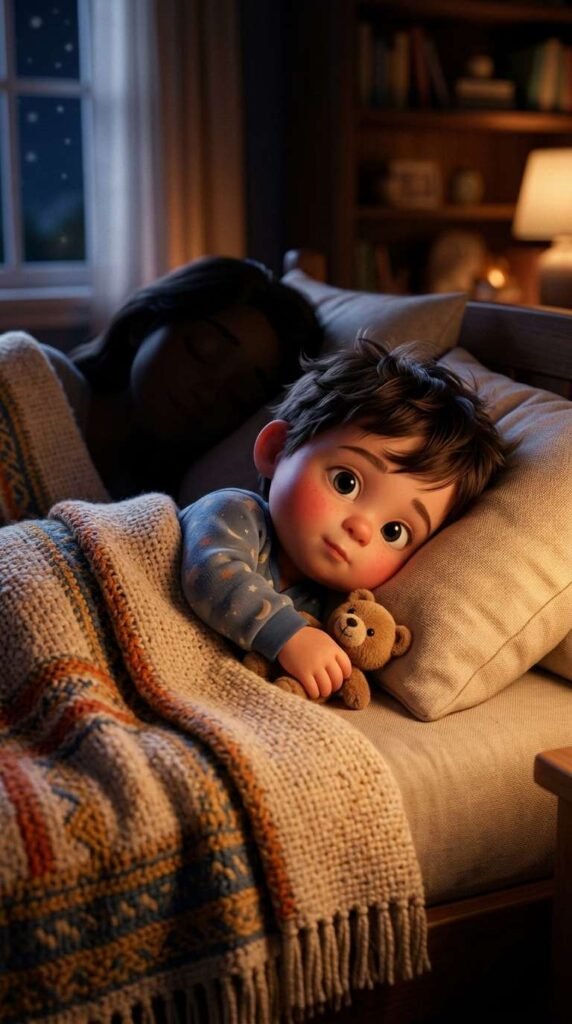
The tool I’m using to create my videos is Pixverse, and they give out free daily credits for you to play around with.
PART 1: FIRST FRAME IMAGE PROMPT
Create the first frame of the video by generating an image in Pixverse.
I usually use the Nano Banana 2 model but do play around with other models to fit your needs.
Here is the prompt:
Close-up 3D animated scene of a cute toddler with big dark eyes and flushed pink cheeks lying in a cozy bed at night. Golden ambient light filters across the beige pillows and woven blankets. Beside him, the silhouette of his sleeping mother rests peacefully. Soft focus background, photorealistic textures, Disney-Pixar art style, heartwarming atmospheric glow, 4k.
PART 2: VIDEO PROMPT SCRIPT (SHOT-BY-SHOT)
I used Seedance Mini (promotional price now) to generate the video. So much cheaper now but still high quality. Remember to set your aspect ratio, length, and audio on. Alternatively, Pixverse V6 is definitely worth a try too. High quality and one of the lowest cost models.
This is the exact prompt I used:
Concept: Morning Snuggle Routine (10 Seconds)
Style/Lighting: Warm golden-hour/lamp lighting, cozy textures, high-emotion 3D Pixar character animation.
- 0:00 – 0:02: The Hook. Close-up on the cute baby waking up in bed under a soft knit blanket, looking around curious and wide-eyed in the dimly lit bedroom.
- 0:02 – 0:05: The Action Move. The baby turns toward his sleeping mother, pushing himself up on small hands and crawling over to rest his tiny torso against her back.
- 0:05 – 0:08: The Affectionate Gesture. He reaches out a small hand to gently touch his mother’s cheek. She slowly opens her eyes, smiling warmly as she wakes up.
- 0:08 – 0:10: The Payoff Embrace. The baby leans in close, cuddling his head against her face and closing his eyes with a joyful, cozy smile while the mother nuzzles back affectionately.
Here’s a tip: You can generate the video using 720p as the resolution instead of 1080p. This will reduce the cost dramatically. Download the video and upscale it here.
PART 3: MUSIC TRACK
This was created inside Pixverse as well.
I like the Google Lyria model but you can also choose to use MiniMax or Elevenlabs too.
Here is the prompt:
Audio Prompt / Sound Mix Direction: Soft, comforting lullaby piano tune blended with gentle acoustic guitar picking and realistic ambient Foley sound design.
- 0:00 – 0:02: Starts with quiet, delicate music notes paired with soft rustling blanket sound effects as the baby moves.
- 0:03 – 0:07: Piano melody swells gently with a tender, warm acoustic guitar harmony as the baby touches his mother’s cheek.
- 0:08 – 0:10: Soft baby coo/sigh audio effect mixed into a gentle musical crescendo, fading into a cozy, soothing resolve.
PART 4: PUTTING IT ALL TOGETHER
Finally, I uploaded the finished video and audio track into Capcut (or Canva) and made slight adjustments to the color to my liking. If you are trying to monetize with Facebook using the Content Monetization program, take note that your videos need to be at least 10 seconds long. A trick you can use is to adjust the speed of your video to 0.95, which adds half a second to a 10 seconds video, ensuring you comply with the requirements.
That’s it! Don’t forget to try out Pixverse as it’s one of the most capable and value for money tools out there right now!