

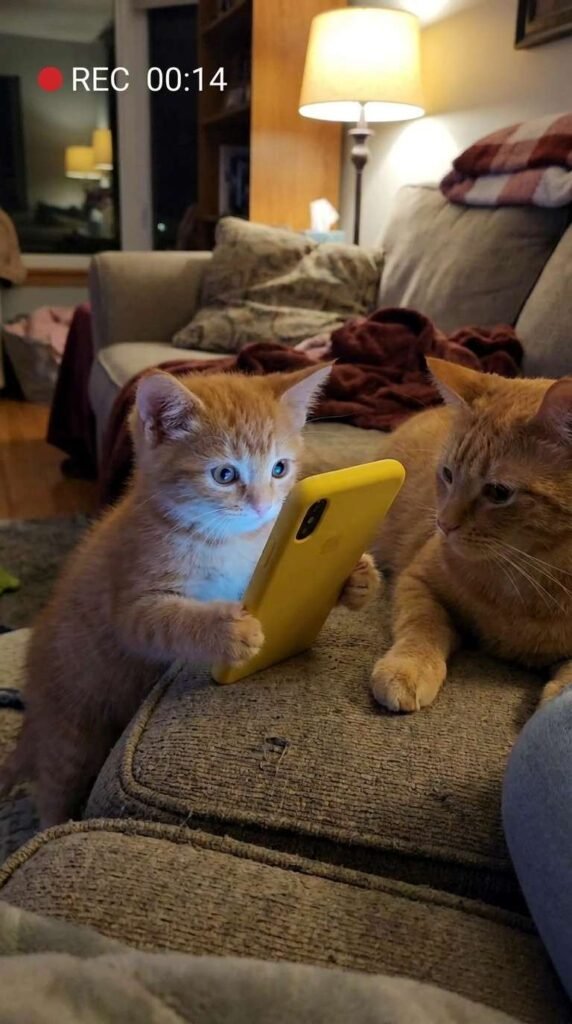
The tool I’m using to create my videos is Pixverse, and they give out free daily credits for you to play around with.
PART 1: FIRST FRAME IMAGE PROMPT
Create the first frame of the video by generating an image in Pixverse.
I usually use the Nano Banana 2 model but do play around with other models to fit your needs.
Here is the prompt:
Smartphone video camera perspective of a tiny orange kitten sitting on a living room couch, clutching a yellow smartphone that casts a blue light glow onto its face. Beside the kitten, a calm adult ginger cat rests its paw on the cushion. Soft living room ambiance, warm indoor lighting, high-contrast character detail, funny cat meme aesthetic, 4k resolution.
PART 2: VIDEO PROMPT SCRIPT (SHOT-BY-SHOT)
I used Seedance Mini (promotional price now) to generate the video. So much cheaper now but still high quality. Remember to set your aspect ratio, length, and audio on. Alternatively, Pixverse V6 is definitely worth a try too. High quality and one of the lowest cost models.
This is the exact prompt I used:
Concept: The Smartphone Tantrum & Plot Twist (15 Seconds)
Style/Lighting: Cozy living room ambient lighting, handheld viral video camera style, rapid funny character reactions.
- 0:00 – 0:02: The Hook. A tiny ginger kitten sits on a beige sofa engrossed in a glowing yellow smartphone while an adult orange cat sits beside it.
- 0:02 – 0:05: The Tantrum. A human hand reaches into the frame and snatches the phone away. The kitten instantly arches its back, throwing a dramatic temper tantrum, rolling onto its back and crying out.
- 0:05 – 0:07: The Discipline. The adult orange cat reaches over and gives the squirming kitten a quick, funny discipline swat on the belly to calm it down.
- 0:07 – 0:10: The Quick Fix. The human hand hands the phone right back. The kitten instantly stops crying, grabs the phone with both paws, and stares at the glowing screen in total peace.
- 0:10 – 0:13: The Surprise Rival. Suddenly, a third cat (an angry Scottish Fold) leaps down from the top of the sofa, hissing and glaring directly at the adult orange cat.
- 0:13 – 0:15: The Climax & Freeze-Frame. The Scottish Fold delivers a swift paw slap across the adult orange cat’s face, knocking it backward off the couch while the kitten keeps staring at its phone.
Here’s a tip: You can generate the video using 720p as the resolution instead of 1080p. This will reduce the cost dramatically. Download the video and upscale it here.
PART 3: MUSIC TRACK
This was created inside Pixverse as well.
I like the Google Lyria model but you can also choose to use MiniMax or Elevenlabs too.
Here is the prompt:
Audio Prompt / Sound Mix Direction: Comedy sound-effect dub layered over chaotic cat vocalizations and rapid slap sound effects.
- 0:00 – 0:02: Starts with calm indoor room ambiance and quiet electronic phone clicks.
- 0:02 – 0:06: Sudden dramatic “swoosh” sound effect as the phone is taken, followed by high-pitched, comical baby/kitten crying dubs and soft “thup-thup” paw-slap sound effects.
- 0:07 – 0:10: Immediate silence and a soft sigh as the phone is returned, returning to cozy ambiance.
- 0:10 – 0:15: Loud dramatic action-movie bass drop, an intense cat hiss, and a loud, comical “SLAP!” sound effect as the third cat strikes, ending with a funny record scratch.
PART 4: PUTTING IT ALL TOGETHER
Finally, I uploaded the finished video and audio track into Capcut (or Canva) and made slight adjustments to the color to my liking. If you are trying to monetize with Facebook using the Content Monetization program, take note that your videos need to be at least 10 seconds long. A trick you can use is to adjust the speed of your video to 0.95, which adds half a second to a 10 seconds video, ensuring you comply with the requirements.
That’s it! Don’t forget to try out Pixverse as it’s one of the most capable and value for money tools out there right now!